

VIDEO
Welcome to an in-depth exploration of split frequency operation with the Yaesu FT-710 transceiver. Whether you're a seasoned operator or just starting your journey in amateur radio, understanding how to effectively use split frequency can enhance your DX (distance) working experience. In this post, I will walk you through the nuances of split frequency operation, the features of the FT-710, and practical tips to get the most out of your radio.
What is Split Frequency Operation?
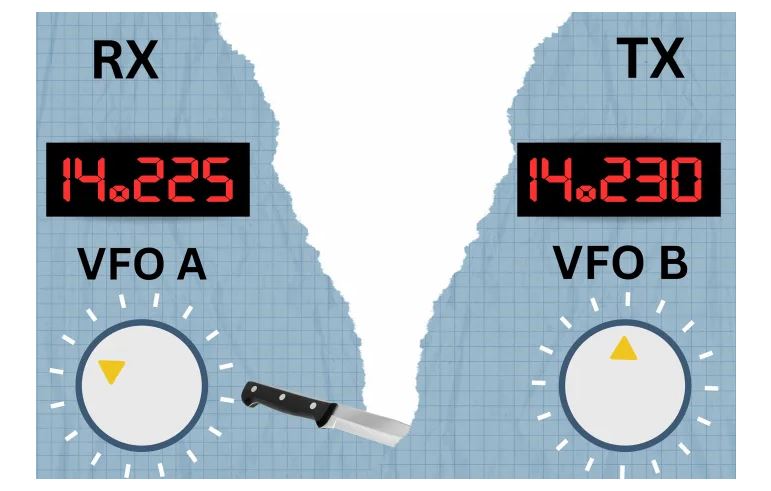
Split frequency operation is a technique used primarily in DX communications. In simpler terms, it involves transmitting on one frequency while receiving on another. This method became necessary as amateur radio evolved, especially when dealing with pile-ups where many operators attempt to contact a single DX station. The primary goal is to keep the frequency clear for the DX station while allowing operators to call in without overwhelming the channel.
Back in the day, when I first got licensed in 1960, split frequency working was common due to the limitations of crystal-controlled transmitters. Each operator would often have different crystals for their transmitters, leading us to work split frequency almost out of necessity. Today, while the technology has advanced, the principles remain similar, especially when working DX.
Why Use Split Frequency?
There are several reasons to use split frequency when operating. The most significant advantage is that it helps to reduce interference and allows a DX station to hear calls from various operators without being swamped. When a DX station transmits on one frequency and listens a few kilohertz up or down, it creates a space where operators can call without overwhelming the listening frequency.
Moreover, many DX stations choose to operate this way intentionally. By doing so, they can maintain a clear channel during busy operations, making it easier for them to pick out individual calls from the noise. This method requires a bit of skill and practice, but it can significantly increase your chances of making successful contacts.

Getting Started with the Yaesu FT-710
The Yaesu FT-710 is a fantastic transceiver that excels in split frequency operation. Despite being positioned as a budget-friendly option compared to higher-end models, it boasts impressive performance and a range of features that make it a reliable choice for amateur radio enthusiasts.
One of the standout features of the FT-710 is its superb receiver. It allows operators to tune their receiver away from the original frequency, enabling them to monitor both the DX station and the surrounding activity effectively. This is crucial when trying to find the right moment to call in without stepping on other operators.
Step-by-Step Guide to Split Frequency Operation on the FT-710
Now, let’s dive into how to operate split frequency on the FT-710. First, make sure you're familiar with the controls of your transceiver. Here’s a simple step-by-step guide:
- Access the Clarifier: Press the clarifier button on the right side of the transceiver. This feature allows you to adjust the frequency you're receiving without affecting your transmit frequency.
- Select the Cursor: On the screen, make sure the cursor is selected. If it isn’t, click until it is.
- Adjust the Receiver Frequency: Press the clarifier button until you see "Clarifier RX" on the screen. Now, you can tune the receiver away from the original frequency, allowing you to listen either side of the original frequency.
- Set the Transmit Frequency: Press the clarifier button again until it shows "Clarifier TX." Now, you can adjust the transmit frequency away from the frequency you’re tuned to. This is the essence of split frequency operation.
Using the Display Effectively
The FT-710's display is not just for show—it's a powerful tool for enhancing your DX operations. When you’re engaged in split frequency communication, the display allows you to visualize where other operators are transmitting. Here’s how to use it to your advantage:
- Monitor Caller Activity: When a DX station is active, you'll see other callers on the right side of the screen. This visual representation helps you find a suitable gap to slot your signal in.
- Identify Open Spaces: Look for a solo signal when the DX station is responding to another operator. Once you identify it, park your signal nearby, increasing your chances of being heard when the DX station resumes listening.
- Practice Makes Perfect: While it may take some practice to get the hang of this, using the display effectively can significantly improve your success rate in pile-ups.
Resetting Your Clarifier
After completing a QSO (conversation), it’s essential to reset your clarifier to ensure that your transmit frequency aligns with the original frequency you were listening to. To do this, hold the clarifier button down for about a second. This action zeros everything, putting you back to square one and ready for your next call.
Common Questions About Split Frequency Operation
Many operators have questions regarding the intricacies of split frequency operation. Here are a few common queries and their answers:
1. How do I know which frequency is my transmit and receive frequency?
In split mode, typically, your receive frequency will be displayed as the larger number, while the transmit frequency is the smaller one. However, this can vary based on the specific setup of your radio, so it's essential to familiarize yourself with your transceiver’s display layout.
2. What happens if I forget to reset my clarifier?
If you forget to reset your clarifier, you might end up transmitting on the wrong frequency, which could disrupt other operators. Always make it a habit to reset after completing a QSO.
3. Is split frequency operation necessary for all DX operations?
While not every DX operation requires split frequency, it's highly beneficial in busy situations where multiple operators are trying to contact the same station. It helps maintain clarity and reduces confusion.
Final Thoughts
Split frequency operation is an invaluable skill that every amateur radio operator should master, especially if you're keen on working DX. The Yaesu FT-710 is well-equipped to facilitate this operation, with features that enhance your experience and make it easier to navigate busy bands.
As you practice and become more familiar with your FT-710, you’ll find that split frequency operation can significantly improve your chances of making successful contacts. Remember to be patient, keep practicing, and enjoy the thrill of connecting with fellow operators around the globe.
Thank you for joining me on this exploration of split frequency operation with the Yaesu FT-710. If you have any questions or tips to share, feel free to leave a comment below. Happy operating!
For more information please visit our online store or alternatively contact us and our team will be happy to assist you!